-
Inviscid Bump in a Channel
Inviscid Supersonic Wedge
Inviscid ONERA M6
Laminar Flat Plate
Laminar Cylinder
Turbulent Flat Plate
Transitional Flat Plate
Transitional Flat Plate for T3A and T3A-
Turbulent ONERA M6
Unsteady NACA0012
Epistemic Uncertainty Quantification of RANS predictions of NACA 0012 airfoil
Non-ideal compressible flow in a supersonic nozzle
Non-ideal compressible flows with physics-informed neural networks
Aachen turbine stage with Mixing-plane
-
Inviscid Hydrofoil
Laminar Flat Plate with Heat Transfer
Turbulent Flat Plate
Turbulent NACA 0012
Laminar Backward-facing Step
Laminar Buoyancy-driven Cavity
Streamwise Periodic Flow
Species Transport
Composition-Dependent model for Species Transport equations
Unsteady von Karman vortex shedding
Turbulent Bend with wall functions
Wind velocity and pollutant dispersion in a city
Incompressible, Lid Driven Cavity Flow
-
Static Fluid-Structure Interaction (FSI)
Dynamic Fluid-Structure Interaction (FSI) using the Python wrapper and a Nastran structural model
Static Conjugate Heat Transfer (CHT)
Unsteady Conjugate Heat Transfer
Solid-to-Solid Conjugate Heat Transfer with Contact Resistance
Incompressible, Laminar counterflow diffusion flame
Incompressible, Laminar Combustion Simulation
User Defined combustion model with Python
-
Unconstrained shape design of a transonic inviscid airfoil at a cte. AoA
Constrained shape design of a transonic turbulent airfoil at a cte. CL
Constrained shape design of a transonic inviscid wing at a cte. CL
Shape Design With Multiple Objectives and Penalty Functions
Unsteady Shape Optimization NACA0012
Unconstrained shape design of a two way mixing channel
Adjoint design optimization of a turbulent 3D pipe bend
Aeroacoustic Pressure Spectrum
| Written by | for Version | Revised by | Revision date | Revised version |
|---|---|---|---|---|
| @tokito-99 | 8.5.0 | @ |
Solver: |
|
Uses: |
|
Prerequisites: |
None |
Complexity: |
Basic |
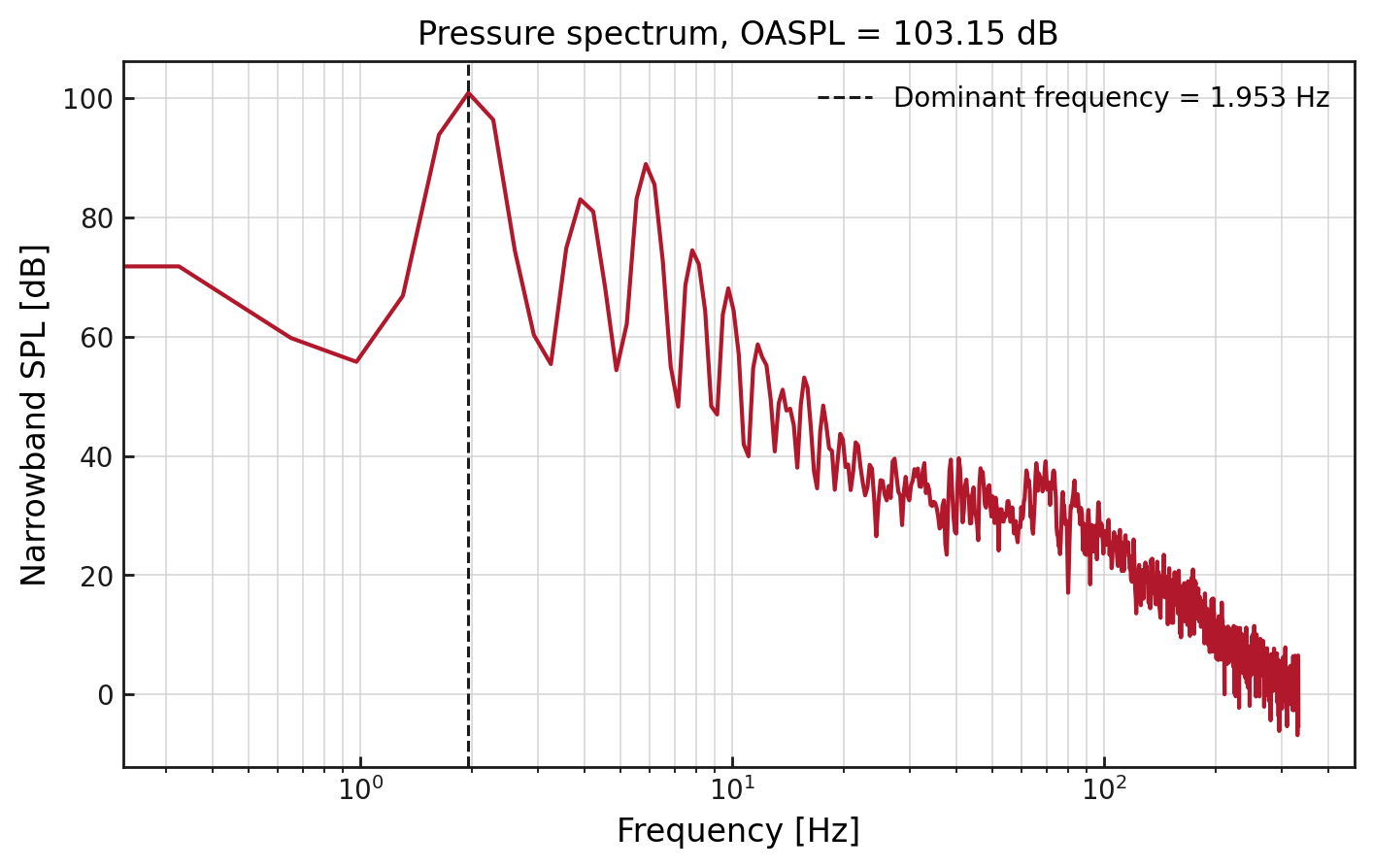
Figure (1): Narrowband SPL spectrum computed from a pressure probe history. The dashed line marks the dominant non-zero frequency.
Goals
This tutorial shows how to use aeroacoustics.py to postprocess an unsteady pressure history written by SU2. The tutorial uses a pressure probe history from an existing unsteady square-cylinder case and computes:
- the pressure power spectral density;
- the narrowband sound pressure level;
- the overall sound pressure level;
- the dominant non-zero frequency.
This is a postprocessing workflow. It does not run a new flow simulation.
Resources
The resources for this tutorial can be found in the workflow_features/Aeroacoustic_Pressure_Spectrum directory in the tutorial repository. You will need the pressure history file history_aeroacoustics.csv and the plotting script plot_spectrum.py.
Tutorial
The following sections show how to prepare a pressure history, run the aeroacoustics postprocessor, and inspect the resulting acoustic quantities. It is assumed that SU2 has been compiled and installed, and that the SU2 tools are available in your path.
Pressure probe history
The input to aeroacoustics.py is a uniformly sampled CSV history file. For a new unsteady SU2 case, pressure probes can be added with custom outputs. For example:
CUSTOM_OUTPUTS= 'mic1 : Probe{PRESSURE}[1.0, 0.0, 0.0]'
HISTORY_OUTPUT= TIME_ITER, CUR_TIME, mic1
The important requirements are:
- the pressure column must contain pressure values;
- the samples must be uniformly spaced in physical time;
- the initial transient should be removed before interpreting the spectrum.
The tutorial input file already contains a pressure column named mic1 and a physical-time column named Cur_Time.
From pressure history to SPL
A pressure probe records a time signal, usually written as (p(t)). For spectral analysis, the useful quantity is the pressure fluctuation around the local mean. The postprocessor removes the mean from each segment by default, so the spectrum is based on the fluctuating part of the signal.
The signal is split into overlapping blocks. Each block is multiplied by a window function and converted from time to frequency with a fast Fourier transform. The squared Fourier amplitudes are scaled to form a one-sided pressure power spectral density. Averaging these spectra over all blocks gives the Welch spectrum used by aeroacoustics.py.
The narrowband SPL in each frequency bin is computed by multiplying the PSD by the frequency-bin width and referencing the result to (p_{ref}=20) micro-Pa:
\[SPL(f_i) = 10 \log_{10}\left(\frac{PSD(f_i)\Delta f}{p_{ref}^2}\right)\]The OASPL is computed by summing the PSD over frequency before applying the same reference pressure. This gives a single pressure level for the analyzed signal.
Running the aeroacoustics tool
Move to the tutorial resource directory:
$ cd workflow_features/Aeroacoustic_Pressure_Spectrum
Run the postprocessor:
$ aeroacoustics.py history_aeroacoustics.csv \
    --pressure mic1 \
    --time Cur_Time \
    --segment-length 2048 \
    --summary acoustic_summary.json \
    --output acoustic_spectrum.csv
The command writes two files. The CSV file contains the frequency-dependent spectrum. The JSON file contains scalar metrics that are useful for quick inspection or automated checks.
The terminal output should be similar to:
Sample rate: 666.66667 Hz
mic1: OASPL = 103.151 dB, dominant frequency = 1.953125 Hz
Spectrum written to acoustic_spectrum.csv
Plotting the results
After running aeroacoustics.py, create the figures with:
$ python3 plot_spectrum.py
This creates:
pressure_history.pngpressure_spectrum.png
The first plot shows the pressure signal in time.
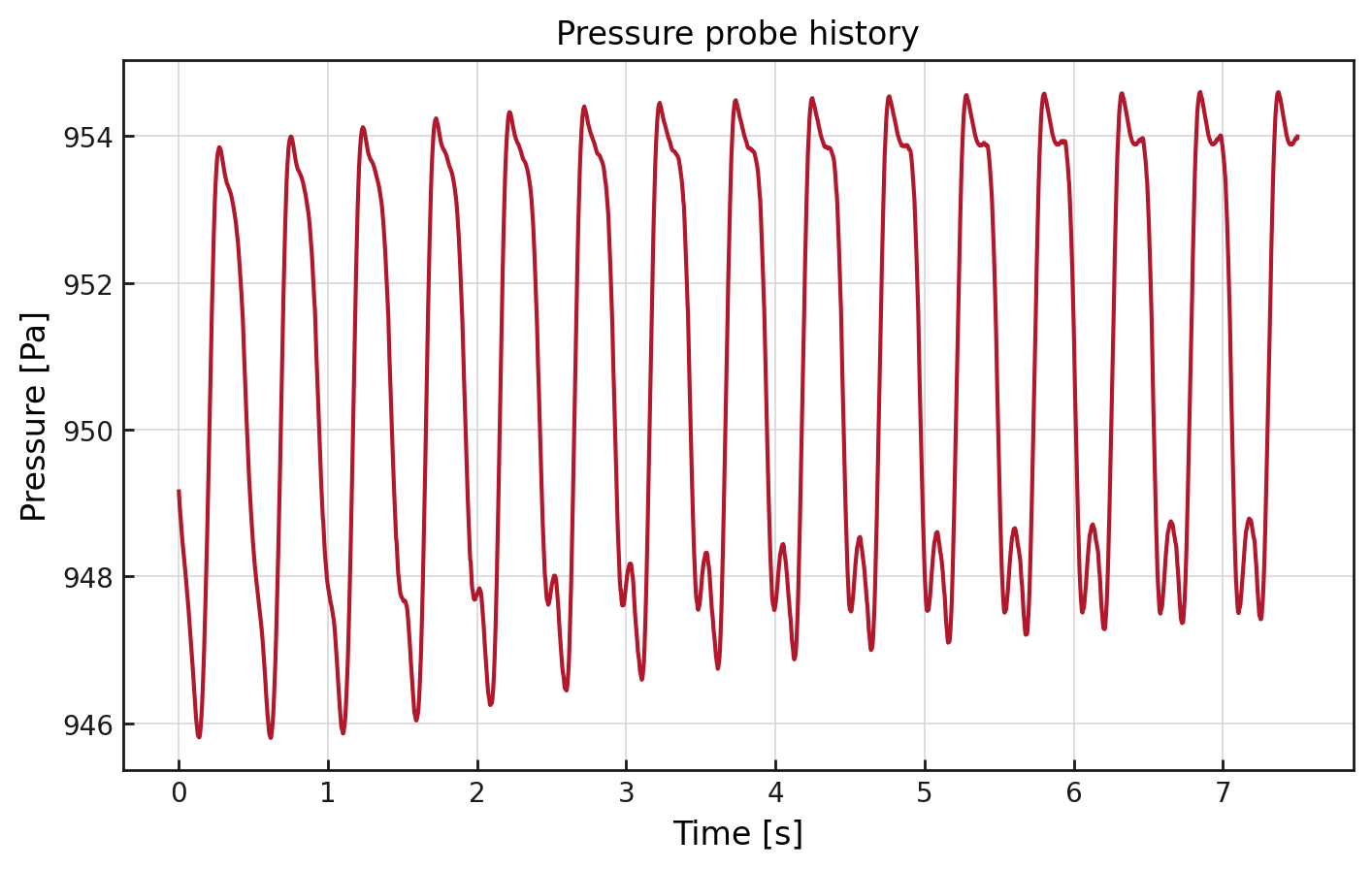
Figure (2): Pressure recorded at the mic1 probe.
The second plot shows the narrowband SPL spectrum.
Figure (3): Narrowband SPL spectrum. The strongest non-zero spectral bin occurs at 1.953125 Hz.
Interpreting the output
The value reported as OASPL is obtained by integrating the pressure power spectral density and referencing the result to 20 micro-Pa. For this tutorial data, the computed OASPL is 103.151 dB.
The dominant frequency is the non-zero frequency bin with the largest pressure spectral density. For this tutorial data, the dominant frequency is 1.953125 Hz.
The spectrum is a probe-pressure spectrum. If the probe is placed in the vortical near field, the result should not be interpreted as a far-field acoustic prediction. Far-field acoustic propagation requires a separate acoustic analogy or propagation method.
Effect of analysis settings
Several command-line options affect the appearance and interpretation of the spectrum.
The --segment-length option controls the frequency spacing. A larger segment length gives a smaller Frequency_Hz spacing, so peaks can be located more precisely. The tradeoff is that fewer blocks are available for Welch averaging.
The --overlap option controls how much neighboring blocks share data. The default value of 0.5 is a common choice for Hann-windowed spectra.
The --window option controls the weighting applied to each block before the Fourier transform. The default Hann window reduces spectral leakage when the signal does not contain an exact integer number of periods inside one segment. Other windows can change peak width and sidelobe levels.
The --detrend option controls how offsets or slow drift are removed from each block. The default mean setting removes the average pressure from each segment. The linear setting can be useful if the history has slow drift.
The --skip-samples option removes samples from the beginning of the file. This is useful when the early part of an unsteady simulation still contains startup transients.
Final notes
A clean spectrum requires enough samples, a fixed time step, and a pressure probe location that matches the question being asked. A near-wake pressure probe can identify dominant unsteady flow frequencies, but it should not be treated as a far-field microphone without an acoustic propagation model.