-
Inviscid Bump in a Channel
Inviscid Supersonic Wedge
Inviscid ONERA M6
Laminar Flat Plate
Laminar Cylinder
Turbulent Flat Plate
Transitional Flat Plate
Transitional Flat Plate for T3A and T3A-
Turbulent ONERA M6
Unsteady NACA0012
Epistemic Uncertainty Quantification of RANS predictions of NACA 0012 airfoil
Non-ideal compressible flow in a supersonic nozzle
Non-ideal compressible flows with physics-informed neural networks
Aachen turbine stage with Mixing-plane
-
Inviscid Hydrofoil
Laminar Flat Plate with Heat Transfer
Turbulent Flat Plate
Turbulent NACA 0012
Laminar Backward-facing Step
Laminar Buoyancy-driven Cavity
Streamwise Periodic Flow
Species Transport
Composition-Dependent model for Species Transport equations
Unsteady von Karman vortex shedding
Turbulent Bend with wall functions
Wind velocity and pollutant dispersion in a city
Incompressible, Lid Driven Cavity Flow
-
Static Fluid-Structure Interaction (FSI)
Dynamic Fluid-Structure Interaction (FSI) using the Python wrapper and a Nastran structural model
Static Conjugate Heat Transfer (CHT)
Unsteady Conjugate Heat Transfer
Solid-to-Solid Conjugate Heat Transfer with Contact Resistance
Incompressible, Laminar counterflow diffusion flame
Incompressible, Laminar Combustion Simulation
User Defined combustion model with Python
-
Unconstrained shape design of a transonic inviscid airfoil at a cte. AoA
Constrained shape design of a transonic turbulent airfoil at a cte. CL
Constrained shape design of a transonic inviscid wing at a cte. CL
Shape Design With Multiple Objectives and Penalty Functions
Unsteady Shape Optimization NACA0012
Unconstrained shape design of a two way mixing channel
Adjoint design optimization of a turbulent 3D pipe bend
Incompressible, Lid Driven Cavity Flow
| Written by | for Version | Revised by | Revision date | Revised version |
|---|---|---|---|---|
| @Thijs Aalbers | 8.5.0 | @ |
Solver: |
|
Uses: |
|
Prerequisites: |
None |
Complexity: |
Goals
Upon completing this tutorial, the user will be familiar with performing a simulation of laminar, incompressible, lid-driven flow within a cavity. Consequently, the following capabilities of SU2 will be showcased in this tutorial:
- Steady, 2D, laminar, incompressible, Navier-Stokes equations
- Dynamic mesh movement MOVING_WALL
- Central Difference Scheme (CDS) convective scheme in space (2nd-order)
- The pressure-correction solver for incompressible flow (PISO)
The intent of this tutorial is to demonstrate the pressure-correction solver (PISO) algorithm of the incompressible solver, by using a very simple test case.
Resources
The resources for this tutorial can be found in the Inc_Lid_Driven_Cavity directory in the tutorial repository. You will need the configuration file (incomp_pb_liddrivencavity.cfg) and the mesh file (mesh_cavity_257x257.su2).
Tutorial
The following tutorial will walk you through the steps required when solving for the flow in the lid-driven cavity using the pressure-correction incompressible flow solver in SU2. It is assumed you have already obtained and compiled the SU2_CFD code for a serial (or parallel) computation. If you have yet to complete these requirements, please see the Download and Installation pages.
Background
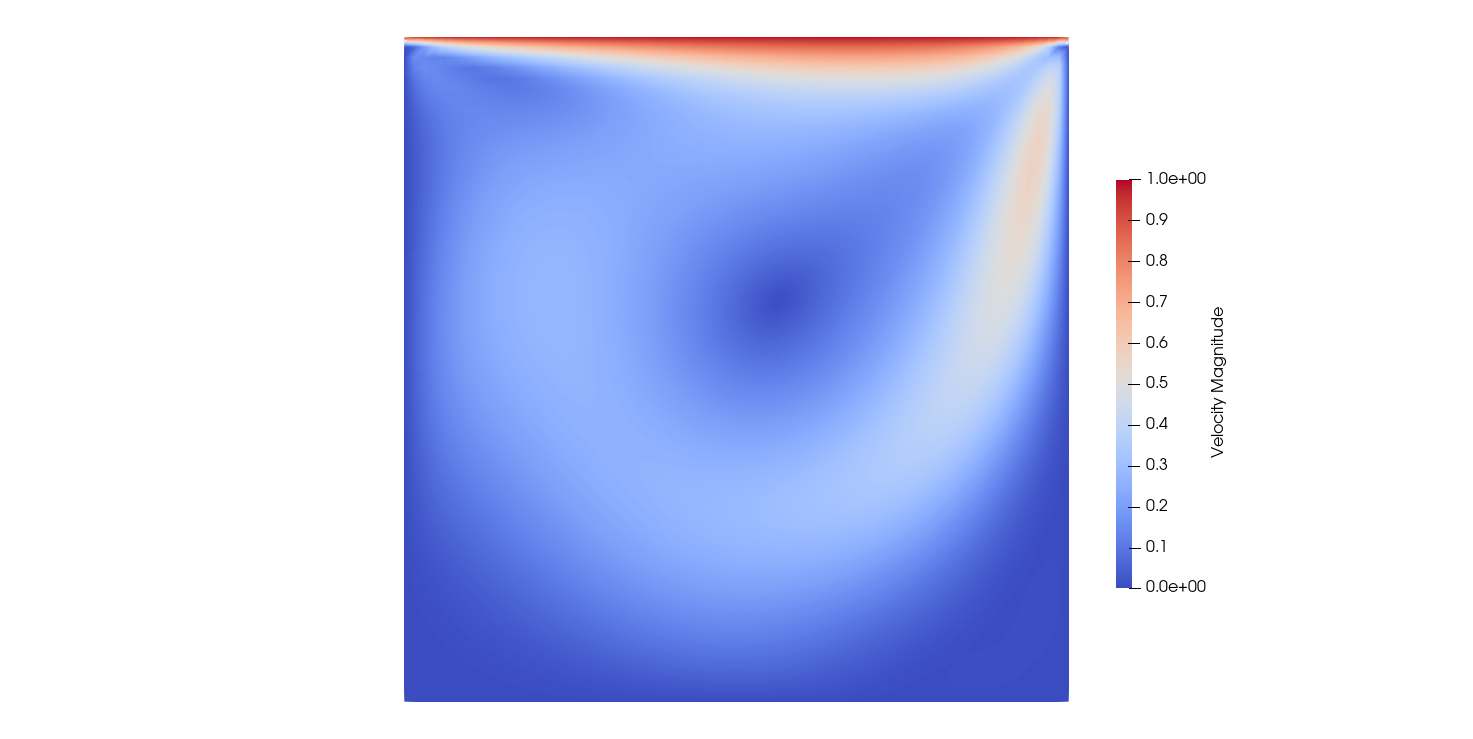
The lid-driven cavity is a classic benchmark problem for testing incompressible flow solvers. It consists of a simple 2D square cavity, with a moving lid. This moving lid creates a driving force on the fluid in the cavity trough the viscosity of the fluid. As the fluid is contained by the cavity, this driving force results in several vortices forming inside the cavity, depending on the Reynolds number.
Problem Setup
The problem setup is meant to be entirely governed by the Reynolds number which is defined as $Re = \rho U L / \mu$. Here, for simplicity, we use $\rho=1$, $U=1$, and $L=1$. Then the Reynolds number is entirely determined by the dynamic viscosity. Here we use a moderate Reynolds number of $400$, we therefore do not have to worry about instabilities caused by turbulence, or require very fine meshes to resolve the boundary layers.
Mesh Description
The computational mesh for the cavity is composed of quadrilaterals with 65 uniformly spaced nodes in both the x- and y-directions. The 4 boundaries of the cavity are no-slip walls. The cavity is 1 m by 1 m.
Configuration File Options
Here, we specify some of the important configuration file options, specifically related to the pressure-correction solver type. We however start with some more general options to set up the problem with a moving lid. We start with a constant density, and a viscosity to get a Reynolds number of 400
% ---------------- INCOMPRESSIBLE FLOW CONDITION DEFINITION -------------------%
%
INC_DENSITY_MODEL= CONSTANT
INC_DENSITY_INIT= 1.0
INC_VELOCITY_INIT= ( 0.0, 0.0, 0.0 )

INC_DENSITY_REF= 1.0
INC_VELOCITY_REF= 1.0
INC_NONDIM= REFERENCE_VALUES

% --------------------------- VISCOSITY MODEL ---------------------------------%
%
VISCOSITY_MODEL= CONSTANT_VISCOSITY
MU_CONSTANT= 2.5E-3
We then define the upper wall to move to the right with a constant velocity as
% ----------------------- DYNAMIC MESH DEFINITION -----------------------------%

% Type of dynamic mesh (NONE, RIGID_MOTION, DEFORMING, ROTATING_FRAME,
%                       MOVING_WALL, FLUID_STRUCTURE, AEROELASTIC, EXTERNAL)
SURFACE_MOVEMENT= MOVING_WALL
MARKER_MOVING= upper
SURFACE_MOTION_ORIGIN = 0.0 0.0 0.0
SURFACE_ROTATION_RATE = 0.0 0.0 0.0
SURFACE_TRANSLATION_RATE = 1.0 0.0 0.0
Now that the moving lid is set up, we continue by defining the pressure-correction algorithm. To activate the pressure-correction solver, we specify
% ------------- DIRECT, ADJOINT, AND LINEARIZED PROBLEM DEFINITION ------------%
%
SOLVER= INC_NAVIER_STOKES
%
% The kind of incompressible solver (DENSITY_BASED, PRESSURE_BASED)
KIND_INCOMP_SYSTEM = PRESSURE_BASED
Once we have selected the pressure-correction solver instead of the default solver for incompressible flow, we can continue specifying options for the algorithm. Here, we use the PISO algoritm, which means that we use 2 corrections instead of 1, this is defined by setting the PISO_CORECTIONS setting to 2 (default is 1). We use a PISO algorithm (with multiple corrections) to improve the convergence speed by allowing a greater CFL number.
For a regular PISO algorithm, the pressure and momentum underrelaxation is commonly not used, as this is not needed, we therefore also do not touch these and leave these as 1. Lastly, we have the option to alter the influence of the transient term in the coefficients used by the algorithm. These coefficients are dependent on the time step, which means that the final solution can be dependent on the CFL. Here, this effect does not influence the final solution noticeably and we therefore keep it.
% ----------------------- PRESSURE BASED PARAMETERS ---------------------------%
%
KIND_PB_ITER= SIMPLE
PISO_CORRECTIONS = 2
RELAXATION_FACTOR_PRESSURE= 1.0
RELAXATION_FACTOR_MOMENTUM= 1.0
TRANSIENT_TERM_REMOVAL_FACTOR= 0.0
Lastly, we must take care of the solution method for the poisson equation that is required when solving for the pressure-correction. This is notoriously a bottleneck in the algorithm, as it often has difficulty to converge fast. For a low Reynolds number case such as this, this is not so much an issue which is why we use FGMRES. At the time of writing this, there does not yet exist a linear solver method specifically for the poisson solver which makes this more difficult and important at larger Reynolds numbers or finer meshes.
POISSON_LINEAR_SOLVER= FGMRES
POISSON_LINEAR_SOLVER_PREC= ILU
POISSON_LINEAR_SOLVER_ERROR= 1E-4
POISSON_LINEAR_SOLVER_ITER= 1000
Running SU2
To run this test case, the follwing steps can be applied. First, make sure that the config file and mesh file are copied to the same directory. Also make sure that SU2 is compiled, installed and that the install location was added to your path.
In Serial
To run the test case in serial, enter the following in the command line
$ SU2_CFD incomp_pb_liddrivencavity.cfg
In Parallel
To run it in parallel, using NP number of processors, enter the following command in the command line
$ mpirun -np NP SU2_CFD incomp_pb_liddrivencavity.cfg
Results
Results of the test case are shown below. We compare the results (postprocessed in Paraview) to results obtained by Ghia et al. which shows excellent agreement.
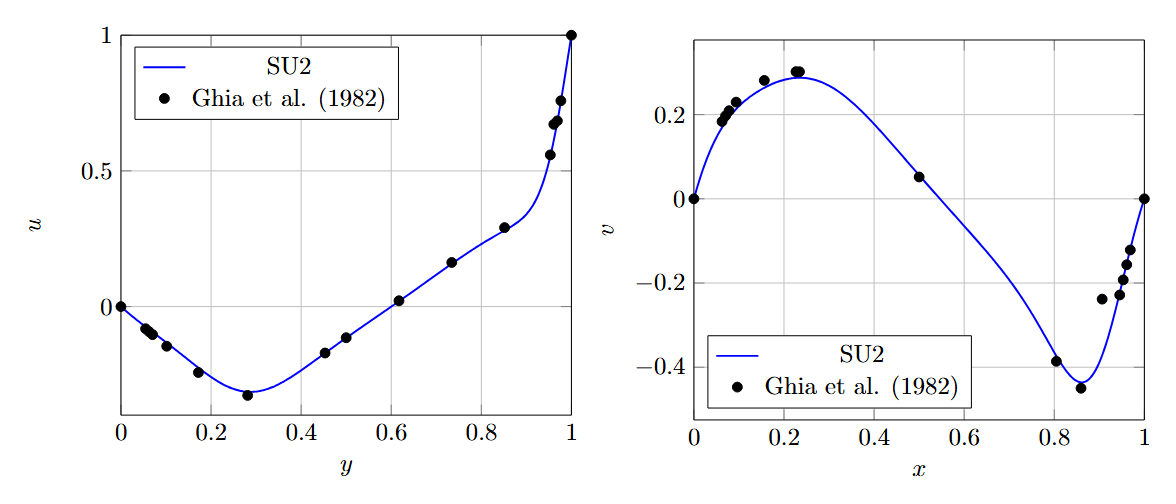
Figure (1): A plot of the velocities along the midlines ($x=0.5$ and $y=0.5$ respectively) compared to the results reported by Ghia et al.